Best Hunting Times
- 2.4
- Rating
- 10.00K
- Installs
- $2.99
- Price
 Analysis by App-foxy
I tested Best Hunting Times as a focused weather app for planning outdoor activity, and my first impression was that it is much narrower than a typical forecast service. It is built around one practical question: when are conditions likely to be more favorable for hunting on a chosen date and in a chosen location? That direct purpose can be useful, but it also means the app should not be judged like a full daily-weather replacement.
The app comes from K Solution and sits in the weather category. It costs $2.99, carries an Everyone age rating, and has reached over ten thousand installs. Its average rating is 2.4 from around one hundred ratings, with roughly seventy written reviews. Those figures suggest a product with a small but real audience and a mixed reception, so I approached it as a specialist utility rather than assuming it would offer the polish of a major weather platform.
In my experience, the most sensible way to use it is alongside ordinary weather information. I would use this app to identify potentially useful hunting periods, then check a trusted forecast for rain, wind, temperature, visibility, and any local warnings. That two-step approach is important because a favorable hunting-time calculation is not the same thing as a complete safety or field-conditions report.
You May Also Like

 Pandora - Music & Podcasts
Pandora’s Music Is Easy to Start, but Harder to Recover
Pandora’s strength is its low-effort path from a seed to a station. Its weak spot is how much confidence it asks you to place in connection, setup, and quiet recovery.

 AccuWeather: Weather Radar
AccuWeather Review: A Quick, Clear Forecast for Everyday Decisions
For everyday plans, the best forecast is the one you can understand quickly. AccuWeather makes rain timing, radar, and local conditions easy to act on, with a few trade-offs.

 Hill Climb Racing
Why Hill Climb Racing Still Turns Crashes Into One More Run
A tiny car, a bumpy hill and one more upgrade: Hill Climb Racing keeps resurfacing because its simple chaos makes every near-miss feel personal.

 AliExpress - Shopping App
AliExpress Makes Global Shopping Feel Personal, but Shoppers Bear the Risk
AliExpress turns a global marketplace into a pocket-sized discovery engine. Its reach is useful, its shopping loop compelling, and its trade-offs easy to miss.

 Lords Mobile: Kingdom Wars
Lords Mobile Is a Kingdom-Building Routine, Not a Quick Match
A case-by-case verdict on the building, battles, device demands, and social commitments that make Lords Mobile rewarding for some players and exhausting for others.

 PDF Scanner app - TapScanner
TapScanner Makes Paperwork Easier to Capture, Check, and Share
TapScanner makes scanning with a phone feel less like a rescue operation and more like a dependable step in getting work done. Its capture tools are useful, though not flawless.
More From Our News Desk
View All News


How it fits into a shared household routine
When several people share responsibility for an outing, I find it helps to decide in advance who checks the date and location and who confirms the broader forecast. That small division of labor makes the app’s focused result easier to use without treating it as a complete household plan. The next section looks at practical habits that keep shared-device use clear.
A practical scenario before an early outdoor trip
Imagine a household where one person is planning an early outing and another person is responsible for transport, meals, or checking in later. Instead of passing around a complicated weather screen, the hunter can open the app, choose the relevant date and location, and use the resulting time guidance as the starting point for the plan. The other person can then compare that schedule with the regular forecast and decide when departure, return, and check-in should happen.
This is where the app’s narrow focus becomes a strength. It does not try to be a general-purpose weather dashboard in the way a mainstream forecast app does. A user who only wants to know whether it may be worth going out at a particular part of the day can reach that decision with less distraction. I found that useful when thinking about a trip in terms of time windows rather than constantly watching changing weather cards.
However, the household should treat the app’s result as planning input, not as a shared safety plan. If someone at home needs to know when the hunter will leave, where they will be, or when they are expected back, those details still need to be agreed separately. Best Hunting Times does not replace a phone call, message, calendar entry, or established check-in routine. Its role is narrower: helping one person choose when to consider going.
What I would do before relying on a result
I would first enter the location carefully, select the intended date, and read the output as a recommendation for timing rather than a guarantee. I would then open a conventional weather service and compare the proposed period with the forecast. If strong wind, severe weather, poor visibility, or difficult road conditions are expected, I would let those factors override the app’s suggestion.
A useful habit is to make the decision in two passes. The first pass answers, “Which part of the day looks most promising according to this specialist tool?” The second asks, “Is that period actually practical and safe for this location?” This prevents a common mistake: treating a favorable calculated period as permission to ignore conditions on the ground.
Using one device without confusing household plans
On a shared phone or tablet, I would keep the app’s use tied to a clearly stated purpose. One person can research a date and location, while another person can review the general forecast and travel arrangements. Because the app is a focused utility rather than a household organizer, the boundaries have to come from the people using the device.
That arrangement works best when users avoid assuming that the last location or date on screen represents the next person’s plan. Before acting on a result, I would recheck both fields and say the intended outing aloud or record it in the household’s normal planning method. This is a small step, but it matters when several people use the same device for different trips.
Setup, boundaries, and day-to-day use
I would make the chosen date and location part of a quick check before relying on a result, especially if someone else has used the device since the last calculation. A simple spoken confirmation can prevent an old choice from being mistaken for the current plan. With those boundaries in place, the following section turns to coordinating the actual outing.
The app’s basic workflow
The central workflow is straightforward: choose a date, choose a location, and review the hunting-time result. That simplicity is likely to appeal to people who do not want to build a detailed weather profile or manage a large collection of saved activities. It also makes the app easy to explain to a family member who only needs to repeat the calculation for a different day.
At the same time, the limited scope means the quality of the experience depends heavily on accurate input. A nearby town may not represent the conditions at a remote field, wooded area, or ridge. Even if the app accepts a location that seems close enough, the practical environment can differ because of terrain, access roads, shelter, and local weather changes. I would choose the closest meaningful location available rather than relying on a broad regional label.
One non-obvious advantage is that a date-specific tool encourages planning before the trip instead of encouraging constant checking during it. I can compare several possible dates and identify which one deserves a closer look. The trade-off is that this kind of planning can feel too limited for users who want live observations, radar, alerts, or a continuously updated forecast in the same screen.
Separate the timing calculation from field decisions
The most important boundary is conceptual. “Best hunting times” should be read as a calculated indication, not a promise that animals will appear or that conditions will be favorable in every practical sense. Wildlife behavior, land access, local rules, personal experience, and changing weather all influence the outcome. The app can help organize a schedule, but it cannot make the whole decision for me.
I would also avoid using it as the only source for an unfamiliar area. For a known location, its focused output may be enough to begin planning. For a new location, I would add a map, local information, a standard forecast, and whatever legal or land-access checks apply. This is especially important when the outing involves a long drive, limited daylight, or coordination with other people.
Why the price changes the decision
At $2.99, the app is inexpensive in absolute terms, but it is still a paid purchase for a narrow purpose. I think that price makes sense for someone who hunts regularly and wants a dedicated timing reference without paying for a larger subscription service. It is harder to justify for a casual user who only needs occasional weather guidance, because free weather apps already cover forecasts and many outdoor-planning needs.
The purchase also raises a practical question for shared devices: who is the intended owner? If one household member does nearly all the planning, installing it on that person’s device keeps the workflow simple. If several people need independent access, the household should decide whether the app’s focused function is used often enough to warrant buying it for more than one device. I would not purchase it broadly before confirming that the central timing feature genuinely fits the group’s routine.
Compatibility and the age context
Version 3.6 requires Android 5.0 or later, so users with very old Android hardware should check compatibility before expecting to install it. For a current household phone, that requirement is unlikely to be the main concern, but it matters if the shared device is an older spare handset kept for outdoor use.
The Everyone rating also makes the app broadly suitable from an age-classification standpoint. That does not mean a child should independently make decisions about hunting, travel, weather risk, or equipment. In a family setting, I would treat the rating as an indication that the software itself is not restricted to adults, while keeping real-world supervision and responsibility with an appropriate adult.
Trust, privacy expectations, and account boundaries
For shared use, I would avoid assuming that a calculation made by one person automatically represents the whole household’s plan. The app should be treated as a personal research tool unless the household deliberately shares the result through its normal communication method. A screenshot, spoken summary, or calendar note can be more reliable than expecting another person to reopen the same screen later.
I also prefer keeping account boundaries simple. The person who pays for and uses the app most often should manage its installation and updates, while others can ask for the result when needed. That reduces confusion over whose date and location were entered. It also avoids turning a small weather utility into an informal substitute for a family scheduling system.
Coordination before and during the outing
Before leaving, I would share the intended timing window and agree on a check-in point using the household’s usual communication method. During the trip, I would keep the app’s calculation separate from decisions about changing conditions, access, or safety. That distinction helps everyone understand what the timing guidance can contribute—and what still needs a direct update.
Turning a time suggestion into a workable schedule
A useful workflow is to start with the app’s suggested period, then work backward from travel time and preparation. If the recommended window begins early, the actual departure may need to be much earlier. If it ends near dusk, the return plan should allow enough time for packing and travel rather than treating the final suggested minute as the end of the entire day.
This is one of the app’s most useful hidden lessons: the displayed period is only one part of the schedule. A household should add setup, transport, access, and return time around it. I would write down the chosen period in ordinary language, such as “leave before the morning window and check in after arriving back,” rather than sharing only a number that another person may misunderstand.
Comparing it with ordinary weather alternatives
Compared with a standard weather app, Best Hunting Times is more specialized and less comprehensive. A normal forecast service is better for hourly temperature, rain, wind, warnings, and general travel planning. It is also usually the first app I would open when deciding whether an outing is safe or comfortable.
Compared with a general outdoor app, this one may feel lighter because it concentrates on the timing question instead of combining maps, routes, observations, and activity tracking. That can be refreshing when I want a quick answer, but it also means I need another tool for nearly everything outside that narrow decision.
Compared with simply relying on personal experience or a printed schedule, the app offers a repeatable way to check different dates and locations. The benefit is consistency: household members can begin with the same calculation rather than arguing from memory. The weakness is that consistency does not guarantee local accuracy, especially when the selected location is only an approximation of the actual ground.
A better workflow for several possible dates
When choosing between multiple outing dates, I would calculate each date separately and make a small comparison note. I would record the most useful period, then place the ordinary forecast beside it. This exposes an important trade-off: a date with a theoretically attractive period may be less practical than another date with slightly less appealing timing but calmer weather and easier travel.
I would also avoid making the comparison too early and assuming it will remain final. Weather can change, and the app’s date-based result is only one planning layer. Rechecking the regular forecast closer to departure is essential. The specialist calculation helps narrow the schedule; it should not prevent a sensible change of plan.
When another option is clearly better
I would skip this app if my main need were severe-weather alerts, radar, live observations, detailed wind information, or a complete forecast for several people traveling together. A full weather service is the better primary tool in those situations. I would also skip it if I only go hunting rarely and already have a trusted free forecast that meets my needs.
On the other hand, I can see the appeal for a regular hunter who wants a dedicated, uncomplicated reference and does not mind checking a second app for actual weather. The strongest case is not that it replaces everything else, but that it gives one specific planning task its own place in the routine.
My household verdict after using it
Best Hunting Times is a specialized weather utility with a clear purpose and a deliberately narrow workflow. I like that it can turn a vague question about when to go into a date-and-location calculation that is easy to discuss with someone else. For a shared household, that makes it useful as the first step in coordinating a trip, especially when one person handles timing and another checks transport or safety.
Its limitations are just as important. The app should not be mistaken for a complete forecast, a safety service, a family calendar, or a guarantee of hunting success. It requires careful location and date entry, and its $2.99 price is easier to justify for frequent users than for occasional visitors. The mixed average of 2.4 from around one hundred ratings also makes me recommend a cautious purchase decision rather than an automatic one.
For an adult who regularly plans hunting outings and wants a focused timing reference, I think it is worth considering, provided it is paired with a reliable general forecast and a clear household check-in routine. For a family looking for shared controls, account management, or coordinated scheduling, it is not the right tool because those responsibilities remain outside the app. My final view is simple: use it as a planning aid, not as the whole plan.
FAQs for Best Hunting Times
01What is Best Hunting Times, and how does it work?
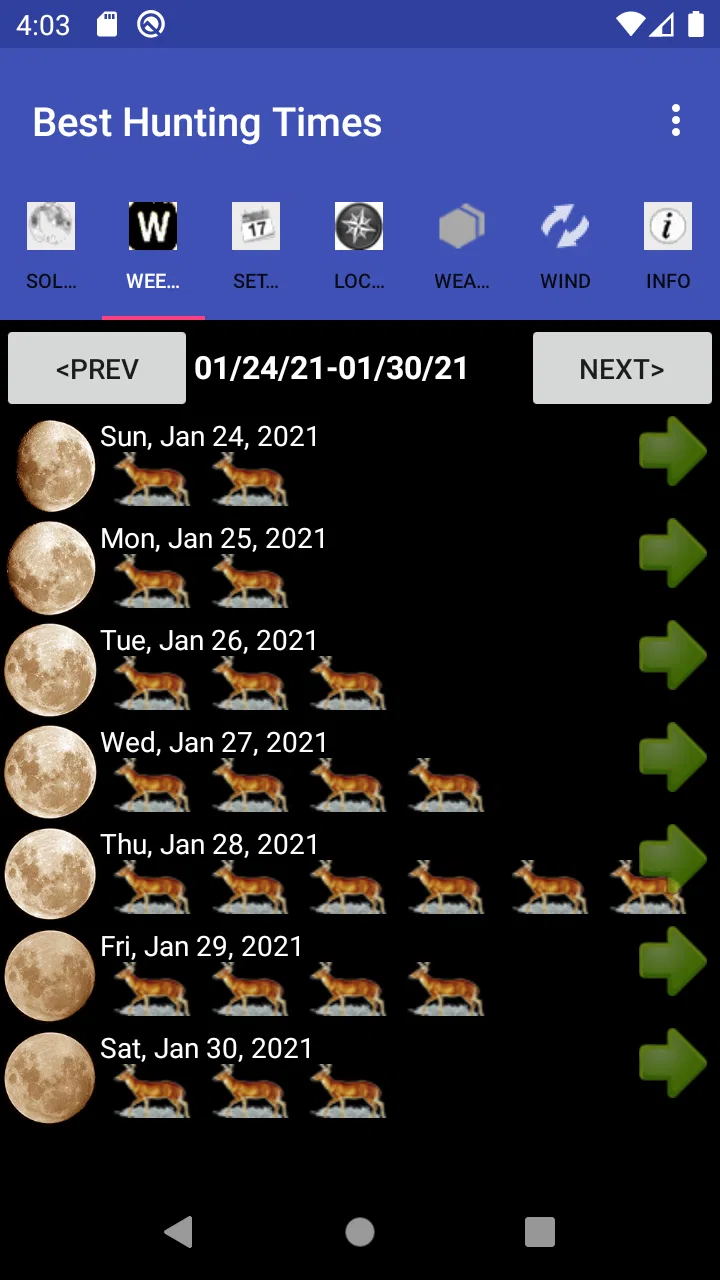
Best Hunting Times is a hunting-planner app designed to help users identify periods that may be more favorable for hunting activity. It typically uses information such as location, date, sunrise, sunset, moon phases, and other time-based indicators to present suggested hunting windows. The app is best treated as a planning aid rather than a guarantee of animal movement or hunting success.
02Does Best Hunting Times require my location, and can I use it without internet access?
The app may request location access so it can calculate accurate sunrise, sunset, moon, and hunting-time information for your area. You should review the permission request and choose the option that matches your comfort level. Some functions may work offline after data is available, but maps, location searches, updates, or other online features could require an internet connection.
03Can Best Hunting Times be used for different animals, hunting areas, and dates?
Best Hunting Times is intended to support planning across different locations and dates, making it useful for hunters who travel or prepare trips in advance. Depending on the version, the app may provide general activity ratings, calendar views, or information connected to particular species and conditions. Always check the selected location, time zone, and date before relying on the displayed results.
04Is Best Hunting Times accurate enough to guarantee a successful hunt?
No hunting app can guarantee that animals will appear or that a hunt will be successful. Best Hunting Times uses astronomical and calendar-based information to estimate potentially favorable periods, but real results are also affected by weather, habitat, animal behavior, hunting pressure, noise, scent, and local conditions. Use its recommendations alongside personal experience, scouting, weather forecasts, and responsible field judgment.
05Is Best Hunting Times free to download, and are there any extra costs?
The download and available features can vary between the Android and iOS versions. Some editions may be free with advertising or limited tools, while advanced features, expanded forecasts, ad removal, or subscriptions may require payment. Before installing, review the store listing for the current price, in-app purchases, supported devices, and subscription terms so you understand the total cost.
Pros
- Simple interface makes daily hunting conditions easy to check.
- Useful sunrise and sunset information for planning outings.
- Moon-phase data can help users choose preferred hunting periods.
- Quick access to time-based activity forecasts.
- Lightweight app that should run smoothly on most devices.
Cons
- Forecast accuracy may vary by location and weather conditions.
- Some features may require location access to work properly.
- Limited value for hunters seeking maps or navigation tools.
- Results are based on general patterns
- not guaranteed animal activity.
- May feel too basic for users wanting detailed hunting analytics.

Best Hunting Times
Gallery